How are DTF transfers made?
How are DTF transfers made? At a commercial level, a DTF transfer starts as a digital file processed through RIP software, gets printed onto PET film by an industrial inkjet printhead running at up to 33 square meters per hour, passes through a powder-shaking machine and a curing oven on a conveyor line, gets quality-checked for banding and misregistration, and is packaged — all before it ever reaches a heat press. That’s a very different picture from the simplified “print, powder, cure, press, peel” summary most guides give, and understanding the real production side matters whether you’re trying to judge a supplier’s quality, deciding whether to print in-house, or just curious what’s actually happening behind the transfers you buy.
This guide goes deeper than our What Is DTF Printing? overview and focuses specifically on how transfers get manufactured — the equipment, the file prep, the quality control, and the real difference between a hobbyist setup and an industrial production line.
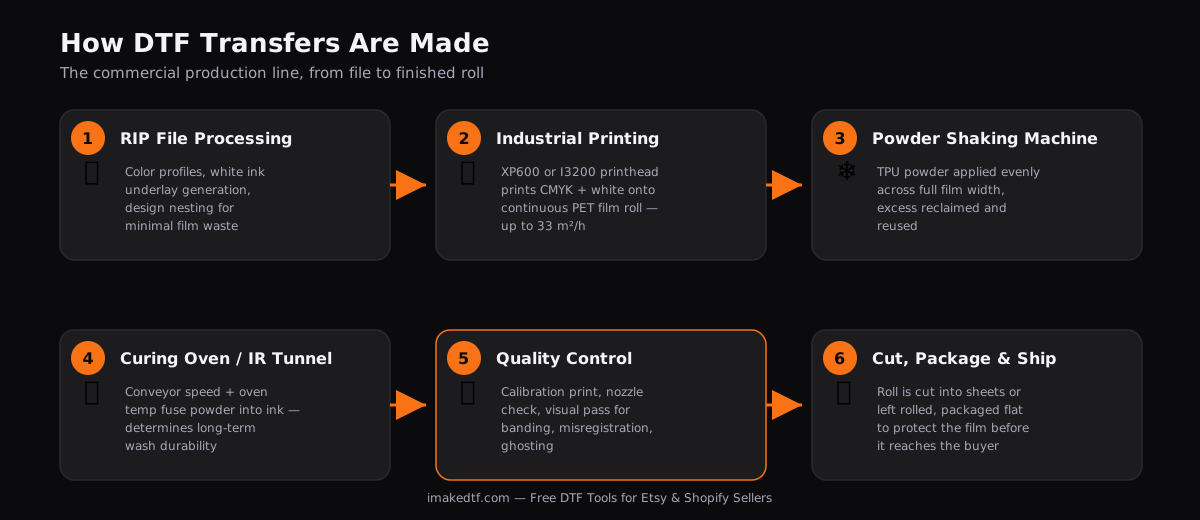
The Real Production Process: From File to Finished Roll
Commercial DTF production follows the same five conceptual steps as any DTF transfer — print, powder, cure, press, peel — but at production scale, three of those steps involve equipment and quality checkpoints a small home setup doesn’t need:
- File processing through RIP software, which manages color profiles, generates the white ink underlay automatically, mirrors the image, and nests multiple designs efficiently onto the film width before anything gets printed.
- Printing on an industrial-grade printhead at controlled resolution and pass count, printed as a continuous roll rather than sheet-by-sheet.
- Powder application via a shaking machine rather than by hand, which applies TPU powder evenly across the full width of the roll and reclaims excess for reuse.
- Curing on a conveyor through an oven or IR tunnel, timed to the roll’s continuous speed rather than pressing a static sheet under a heat gun.
- Quality control inspection before the roll is cut, packaged, and shipped — a step hobbyist setups usually skip entirely and suppliers can’t afford to.
The Equipment Behind the Process
The single biggest factor in transfer quality and production speed is the printhead. Two printheads dominate the DTF market, and the difference between them explains a lot about why transfer quality and price vary so much between suppliers:
The Epson XP600 is the entry-level standard: 1,080 nozzles across 6 rows, a maximum resolution around 1440 dpi, and a price point that makes it the default choice for small shops and beginners. Its main weakness is nozzle lifespan — XP600 heads commonly wear out within 3–6 months under regular use, meaning ongoing replacement cost is baked into a small operation’s economics whether they account for it or not.
The Epson I3200 is the industrial-grade step up: 3,200 nozzles across 8 rows, resolution up to 1200 dpi with Variable Sized Droplet Technology for smoother gradients and less visible graininess, and — critically for production volume — a print speed of roughly 26–33 square meters per hour in single-head mode. That speed difference is why larger suppliers run I3200-based machines: it’s the difference between producing enough film to fill wholesale orders same-day versus not.
If you’re deciding whether to buy a DTF printer at all rather than continuing to order from a supplier, our DTF equipment list covers every piece of hardware beyond just the printhead, and best DTF printers for small business compares specific machine models built around both printhead types.
If a supplier’s transfers consistently show soft, slightly grainy gradients on photo-realistic designs, they’re very likely running XP600-based printers. That’s not automatically bad — it’s more than adequate for solid-color logos and text — but if you’re ordering detailed photographic artwork, ask what printhead your supplier uses before placing a large order.
Print File Preparation: What Happens Before the Printer Even Starts
Production quality is decided before a single drop of ink hits the film. RIP software handles three jobs simultaneously: color management (matching what’s on screen to what the specific ink set can physically reproduce), white ink underlay generation (calculating exactly where opaque white needs to sit beneath color so dark-garment prints don’t show through), and nesting (packing multiple designs tightly across the film’s width to minimize waste — the same packing logic our own Gang Sheet Builder applies for buyers assembling their own sheets).
File resolution matters more at this stage than most buyers realize. A file submitted below 300 DPI at its intended print size will print soft or pixelated regardless of how good the printer or ink is — there’s no production step downstream that fixes a low-resolution source file. If you’re preparing your own artwork before sending it to a supplier, our file readiness checker and print size calculator both catch this before it becomes a wasted print run.
Powder Application at Scale
At hobbyist scale, TPU powder gets shaken over a printed sheet by hand and the excess is tapped off into a tray. At production scale, rolls run through a dedicated powder-shaking machine that applies powder evenly across the full film width, vibrates off everything that didn’t stick to wet ink, and often reclaims the excess through a collection system for reuse — a meaningful cost saving at volume, since TPU powder is a genuine recurring material cost.
Powder mesh size (essentially how fine the powder particles are) is a real production variable most buyers never see reflected in a price difference but absolutely see in the final print: finer mesh powder produces a softer hand feel and better detail retention on fine lines and small text, while coarser powder is cheaper to produce with but can slightly blur very fine detail and sits thicker on the fabric.
Curing: The Production Step That Determines Wash Durability
Curing is where a production line’s consistency either pays off or falls apart. On a conveyor system, the film moves through a curing oven or infrared tunnel at a fixed speed, meaning oven temperature and belt speed together determine actual dwell time — get either one wrong across a long production run and an entire roll can be under- or over-cured before anyone notices, unlike a single hand-cured sheet where a mistake affects one design.
Under-cured transfers look completely normal leaving the factory but fail early for the buyer — the powder never fully melted into the ink, so the transfer looks fine on day one and starts cracking or peeling within a handful of washes, which is why “my supplier’s transfers keep failing” is sometimes a curing-line issue rather than anything the buyer did wrong at the heat press. This is also why our own heat press settings guide recommends always test-pressing a new supplier’s transfers on scrap fabric before committing to a full order — it’s the only way a buyer can catch a curing problem that happened upstream, before the transfer ever reached them.
Quality Control: How Suppliers Catch Defects Before Shipping
Three defect types account for most DTF production quality problems, and understanding them helps explain what you’re actually looking at if a batch of transfers looks off:
Banding — visible horizontal lines or density inconsistency across the print — usually traces back to clogged nozzles, print head misalignment, or an inconsistent curing pass. A properly run production line catches this with a daily nozzle check and a calibration print before a job run starts, not after.
Misregistration — colors or the white underbase slightly offset from the color layer above it — typically comes from feed path problems, belt tension issues, or carriage alignment drift on the printer itself. This is one of the easiest defects to catch visually: look for a faint white halo or color fringing around the edges of a design.
Ghosting or density inconsistency — usually a symptom of an under-calibrated color profile for the specific film/ink combination in use, or a white underbase layer that wasn’t dense enough for the garment color it’s meant to cover.
A production operation with real quality control runs a calibration print before every job, checks film loading and belt tension between rolls, and does a visual pass on finished sheets before packaging — not just a final glance at the shipped product. If you’re buying from a supplier and started noticing recurring registration or density issues across multiple orders, that’s a production-line problem on their end, not something adjusting your own heat press settings will fix.
Small-Batch vs. Factory-Scale Production
The gap between a home setup and an industrial line isn’t just speed — it changes what’s economically sensible to produce at all. A hobbyist printer running an XP600 head might comfortably handle a few dozen transfers a day for a one-person Etsy shop. An I3200-based industrial line running 26–33 m²/h can produce enough film in a single shift to fill hundreds of wholesale orders, which is exactly why the wholesale-transfer-supplier business model exists as its own category, distinct from small-batch print-on-demand. Our DTF business models comparison breaks down the economics of running a wholesale-supply operation versus a custom-order or POD shop — they require genuinely different equipment tiers, not just “the same setup but more of it.”
Should You Make Your Own Transfers, or Buy Them?
Understanding the real production process makes this decision clearer: printing your own transfers only pays off once your order volume justifies industrial-grade equipment, ongoing ink/film/powder costs, and either your own quality control discipline or the willingness to eat the cost of misprints. For most sellers starting out, buying finished transfers from a supplier who’s already solved the printhead, curing, and QC problems is both cheaper and more reliable than a small in-house setup trying to replicate factory consistency on hobbyist hardware. Our DTF printing startup costs breakdown puts real numbers next to both paths so the decision isn’t a guess.
Frequently Asked Questions
What’s the difference between the Epson XP600 and I3200 for DTF printing?
The XP600 is a lower-cost, entry-level printhead (1,080 nozzles, ~1440 dpi max) with a shorter lifespan of 3–6 months under regular use. The I3200 is industrial-grade (3,200 nozzles, up to 1200 dpi with smoother gradient control) and prints significantly faster — around 26–33 m²/h versus the XP600’s slower output.
Why do some DTF transfers fail even though they were printed correctly?
Most early transfer failures trace back to curing, not printing. If the powder wasn’t fully melted into the ink during the curing pass, the transfer can look completely normal but fail within a few washes regardless of how well it’s pressed later.
What causes banding or streaking in DTF prints?
Banding is almost always a nozzle or alignment issue — clogged nozzles, printhead misalignment, or an inconsistent curing pass. It’s caught with a daily nozzle check and a calibration print before a full production run.
Is it cheaper to print my own DTF transfers or buy them from a supplier?
It depends entirely on volume. Below a certain order volume, the cost of a printer, ink, film, powder, and your own quality control time outweighs simply buying finished transfers. See our startup costs breakdown for real numbers on both paths.
How can I tell if a DTF supplier has good quality control?
Order a small test batch before committing to volume. Check for consistent color density across designs, no visible white halo or fringing around edges (misregistration), and press a sample onto scrap fabric to confirm proper cure before ordering at scale.